Streamlining Amazon KDP Publishing with Grid Page Interior Templates
For anyone venturing into the world of self-publishing, particularly through Amazon's Kindle Direct Publishing (KDP) platform, the journey from concept to a physical book can be surprisingly complex. One of the most critical yet often overlooked stages is the creation of the book's interior layout. For low-content books—items like journals, diaries, notebooks, logbooks, and simple cookbooks—this task should be straightforward. Yet, navigating technical specifications like page dimensions, bleed settings, and file formats can become a significant hurdle, slowing down creators and entrepreneurs. This is where a specialized resource like Grid Pages- KDP Interiors becomes an essential tool, fitting seamlessly into the workflow of any serious publisher.
The Role of Interior Templates in a Publishing Workflow
Before diving into the specifics of grid pages, it's important to understand where they fit in the broader publishing process. The creation of a low-content book is rarely just a creative act; it's a project with distinct phases: conceptualization, design, technical preparation, upload, and marketing. The design and technical preparation phases are where many projects stall. A creator might have a brilliant idea for a themed notebook but then spends hours, or even days, wrestling with design software to create a hundred pages of consistent grid layouts, ensuring each page meets KDP's stringent print requirements. This manual work is not only time-consuming but also prone to errors that can lead to rejected uploads or poor print quality.
Grid Pages- KDP Interiors is designed to eliminate this bottleneck. By providing a complete set of tested, ready-to-use templates, it shifts the workflow focus from tedious construction to efficient implementation. Instead of building the foundation, you are free to customize and adapt a proven structure. This approach mirrors best practices in many fields: using standardized, high-quality components to accelerate project execution while maintaining control over the final product's uniqueness.
Technical Specifications and Immediate Usability
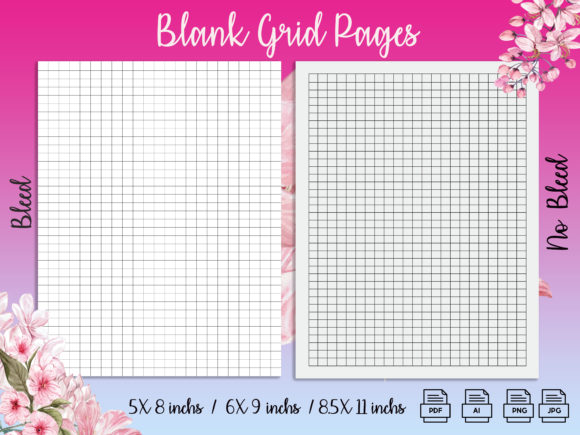
The practical value of these templates lies in their precise alignment with KDP's requirements. The offering includes three of the most popular trim sizes for low-content books: 5" x 8", 6" x 9", and 8.5" x 11". For each size, you receive two critical variations: a version with bleed and a version without bleed. Understanding bleed—the area of a page that is trimmed off during printing to ensure color or design runs to the edge—is vital. Providing both options means you can correctly prepare books where the grid design should extend to the page edge versus those where it should have a clean margin. Each set comprises 100 pages, a standard length for many journals, providing substantial content without overwhelming the user.
The file format suite is equally thoughtful for workflow integration. You receive high-quality print-ready PDFs, which are the final files you upload to KDP. But beyond that, you also get the source files: Adobe Illustrator (AI) files, JPEGs, and PNGs. This is crucial for customization. Perhaps you want to add a subtle logo to each page, change the grid color, or integrate a header for a specialized logbook. Having the editable AI files allows you to make these changes efficiently within professional design software, ensuring consistency across all 100 pages. The JPEG and PNG formats offer flexibility for use in other applications or for quick reference. This multi-format approach supports a workflow where you can use the templates immediately or adapt them as a base for more complex projects.
Integration into Creative and Business Processes
How does one integrate Grid Pages- KDP Interiors into a real-world process? Consider a freelance designer who offers publishing services to small businesses. A client wants a branded notebook for their corporate events. The designer can now bypass the initial layout creation, starting directly with the provided 6" x 9" bleed template. They import the AI file into their design suite, overlay the client's branding elements, and export a new print-ready PDF in a fraction of the time previously needed. This efficiency improves their service turnaround time and profitability.
For the solo entrepreneur or hobbyist, the integration is even more straightforward. If you are an educator creating a series of specialized practice notebooks for your students, you can download the 8.5" x 11" no-bleed templates, use the simple PDFs as they are, and upload them directly to KDP. The process moves from a technical challenge to a simple administrative task. Your focus remains on the marketability and concept of your book series, not on whether the grid lines will print correctly. This seamless integration reduces the barrier to entry, allowing more creators to participate in the KDP marketplace with confidence.
Ensuring Quality and Consistency
A major advantage of using pre-built, KDP-standard templates is the inherent quality control. When you create interiors manually, consistency across 100 pages is hard to guarantee. Margins might shift, line weights might vary, and page counts might be misaligned. These tiny errors are often invisible on a screen but become glaring in a printed physical product. The Grid Pages templates are tested, meaning these issues have been resolved. This reliability is a cornerstone of long-term use. As you publish more low-content books, you can rely on the same template sets, establishing a consistent quality across your entire catalog. This consistency builds brand trust with your customers who expect a professional product every time.
Furthermore, the organization of your digital assets improves. Instead of a scattered collection of self-made files with inconsistent naming conventions, you have a standardized set: clearly labeled by size and bleed setting. This organizational efficiency is valuable not just for the current project but for future ones. When you need to create another 5" x 8" diary six months later, you know exactly where your trusted base template is, and you can begin work instantly.
Practical Implementation for Various Use Cases
The application of these grid pages extends beyond simple notebooks. Their structure supports a variety of low-content book formats. A cookbook planner, for instance, can use the grid as a background for writing recipes and meal plans, providing neat visual alignment for text. A project management logbook can utilize the grids for creating charts, timelines, or task lists. The clean, unobtrusive grid serves as a versatile foundation that enhances functionality without dictating content.
For those focusing on scalability—perhaps a publisher aiming to release dozens of niche journals—the editable AI files are the key asset. You can establish a master template for your brand. By making global adjustments to the source file, such as changing the grid style or adding a universal footer, you can then generate entire new template sets for different trim sizes. This creates a scalable, efficient production pipeline. Your preparation work moves from per-book design to one-time system setup.
Finally, the usability of these templates interacts directly with other tools and decisions in your workflow. Your choice of trim size might be influenced by market research or cost analysis. Having all three popular sizes covered means your technical toolkit doesn't limit your business decision. Similarly, when you are ready to upload, the compatibility of the provided PDFs with KDP's upload system removes a layer of pre-launch anxiety. You can proceed from final content decision to marketplace listing in a smooth, predictable sequence.
In essence, Grid Pages- KDP Interiors is not just a product; it's a workflow component. It addresses the technical and repetitive aspects of low-content book creation, allowing human creativity and business acumen to focus on the areas where they matter most: concept, branding, marketing, and audience building. By integrating such a resource into your process, you transform book interior creation from a daunting obstacle into a simple, reliable step—a shift that can accelerate your publishing journey and increase your confidence in every project you undertake.